Scary Text to Speech: How to Make AI Voices Sound Creepy

Quick answer
Most text to speech doesn't sound scary because it is too even, too clear, and too fast. To make it creepy, write short lines with deliberate pauses, slow the delivery down, choose a low, breathy, or whispering voice, and use contrast — a calm or cheerful voice saying something unsettling is often scarier than a growl.
Key takeaways
- Fear in audio comes from timing. Ellipses, line breaks, and short sentences do more than any voice setting.
- Slowing speech to about 0.8–0.9× is the single fastest way to add dread.
- Whispers and low voices work for atmosphere; cheerful voices work for twists.
- Repetition and unanswered questions keep listeners on edge.
- Pick one horror voice per character and keep it consistent across the whole story.
Why most text to speech doesn't sound scary
Standard text to speech is built to be clear and pleasant, which is the opposite of what horror needs. A TTS voice reads every sentence at the same pace, with the same energy, and resolves every phrase neatly. Horror depends on the reverse: uneven timing, withheld information, and moments where the listener isn't sure what comes next.
Three habits make AI voices sound safe:
- Even rhythm. Every word gets the same weight, so nothing lands as a shock.
- Too much clarity. Bright, crisp voices feel like customer service, not a dark hallway.
- No silence. The voice moves straight from one line to the next, leaving no room for dread to build.
The good news is that you can fix all three without any audio engineering. Most of the work happens in the script and in the voice you choose.
7 ways to make text to speech sound scary
These techniques work with any horror voice. Combine two or three of them for the strongest effect.
1. Control pauses with punctuation
AI voices pause where your punctuation tells them to. Use that to place silence exactly where you want tension.
- Ellipsis (…) creates a hesitation mid-sentence: "I opened the door… and it was already open."
- Period creates a firm stop. Split one long sentence into three short ones.
- Line break often adds a slightly longer gap than a period.
- Em dash (—) creates an abrupt cut: "I heard it again — closer."
- Exact pauses. When punctuation isn't enough, the voice generator has an Insert pause row with one-click breaks from 0.3 to 3 seconds. Drop a 1.5-second pause before a reveal and the silence does the work.
2. Write short sentences
Long sentences sound like explanation. Short sentences sound like warning. Aim for 4–10 words per line in the scariest moments. Save longer sentences for calm setup, then shorten them as the tension rises.
3. Slow the voice down
Reducing speed to around 0.8–0.9× adds weight to every word without making the voice sound broken. Go slower only for single lines, such as a final reveal. If a slowed voice starts to sound sleepy, speed it back up and add more pauses in the text instead.
4. Choose a low, breathy, or whispering voice
Low voices feel heavy and threatening. Breathy voices feel close, as if the speaker is right next to the listener. Whispers force people to lean in, which makes any sudden change more effective. The table below shows which ready-made horror voice fits which job.
5. Use contrast
A cheerful voice saying something wrong is one of the oldest horror tricks, and it works especially well with AI because the delivery stays perfectly calm. Try a friendly, upbeat voice reading a line like "Don't worry. It only takes a second." The mismatch does the work.
6. Repeat words and phrases
Repetition feels obsessive and unnatural. Repeat a short phrase two or three times, or end a story on a line the listener has already heard. "Don't turn around. Don't turn around. Don't turn around."
7. Leave questions unanswered
Fear lives in what isn't said. End lines on a question, or stop a sentence early. "Did you lock the back door? …Then who just closed it?"
The 8 horror voice presets compared
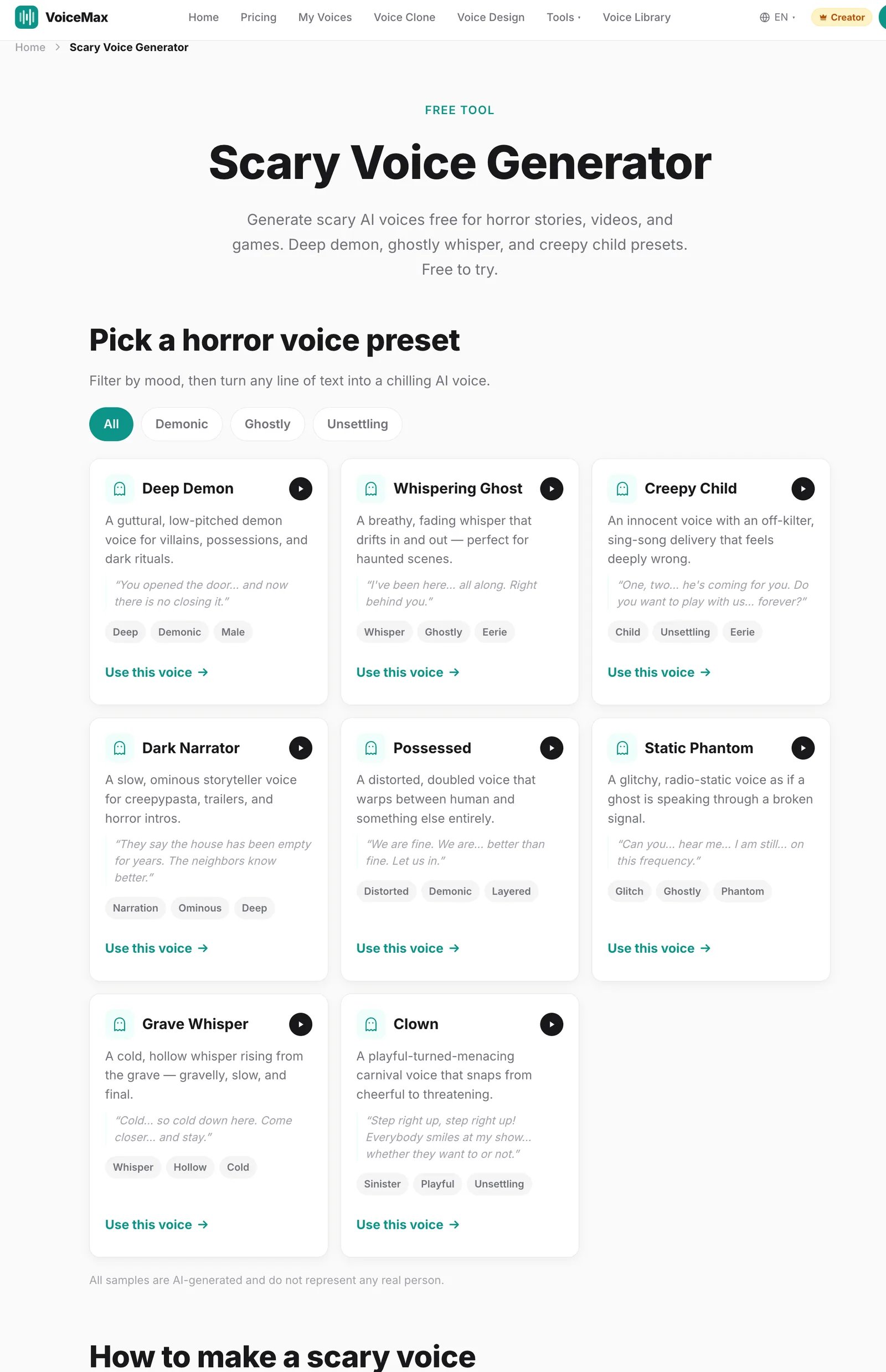
If you don't want to design a voice from scratch, start with a ready-made preset. Each one suits a different kind of scene.
| Preset | Sound | Best for | Pair it with |
|---|---|---|---|
| Deep Demon | Guttural, very low | Villains, possession scenes, rituals | Slow speed, short commands |
| Whispering Ghost | Breathy, fading whisper | Haunted locations, close-up scares | Ellipses, quiet lines |
| Creepy Child | Innocent, sing-song, off-kilter | Twists, nursery-rhyme lines | Repetition, counting |
| Dark Narrator | Slow, ominous storyteller | Creepypasta-style stories, intros, trailers | Longer setup, short reveals |
| Possessed | Distorted, doubled | Transformation moments | Lines that shift from calm to strange |
| Static Phantom | Glitchy, radio-like | Lost signals, recordings, found audio | Broken sentences, dashes |
| Grave Whisper | Cold, hollow, gravelly | Graveyards, final warnings | Very short lines |
| Clown | Playful turning menacing | Carnival scenes, tonal whiplash | Cheerful setup, sudden turn |
You can try all eight on the scary voice generator page and download the result as MP3 or WAV.
Try the Scary Voice Generator →
Listen: the same line, written two ways
The biggest improvement usually comes from rewriting the script, not changing the voice. Both samples below use the Dark Narrator preset at the same speed.
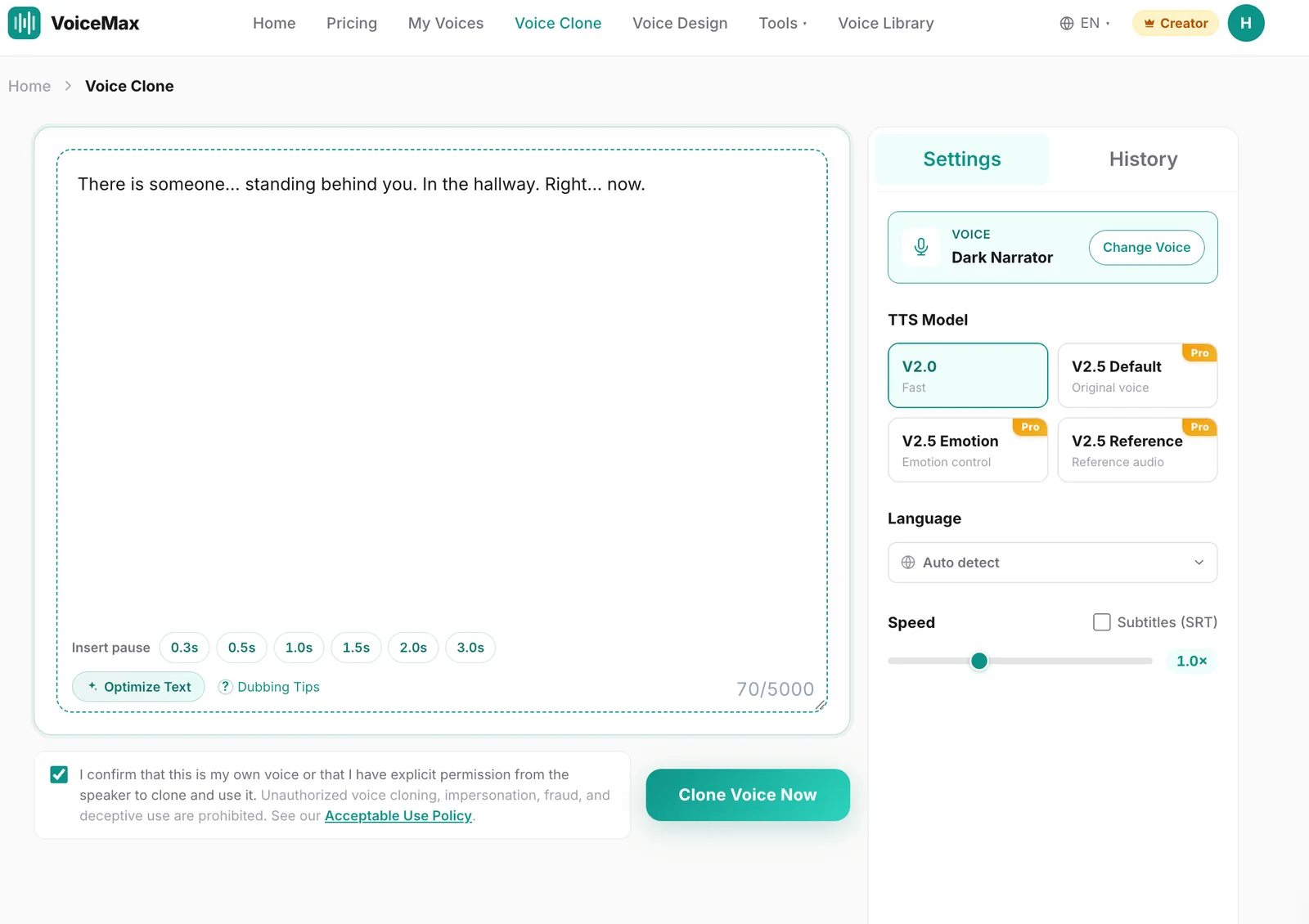
Version B adds three pauses and splits one sentence into four. Nothing else changed.
More samples
All samples are AI-generated and do not represent any real person.
Copy-ready scary lines to test
Paste any of these into a horror preset to hear the techniques in action. All lines are original.
| Technique | Line | Suggested preset |
|---|---|---|
| Pauses | "I counted the steps on the way down. Twelve. …There were thirteen on the way up." | Dark Narrator |
| Short sentences | "The lights went out. The radio stayed on. It was saying my name." | Static Phantom |
| Contrast | "Good night, sweetheart. Sleep tight. I'll be watching." | Creepy Child |
| Repetition | "Let me in. Let me in. I know you're awake. Let me in." | Grave Whisper |
| Unanswered question | "If you're in the kitchen… who is upstairs?" | Whispering Ghost |
| Command | "Kneel. Listen. Do not look up." | Deep Demon |
Using emotion control for horror
Some scenes need fear in the voice itself rather than in the writing — a victim's panicked line, or a narrator who suddenly sounds afraid. With the emotion model on the Creator plan, you get eight sliders — Happy, Angry, Sad, Afraid, Disgusted, Melancholic, Surprised, and Calm — each set from 0 to 1. They change how the line is delivered without changing the voice's timbre.
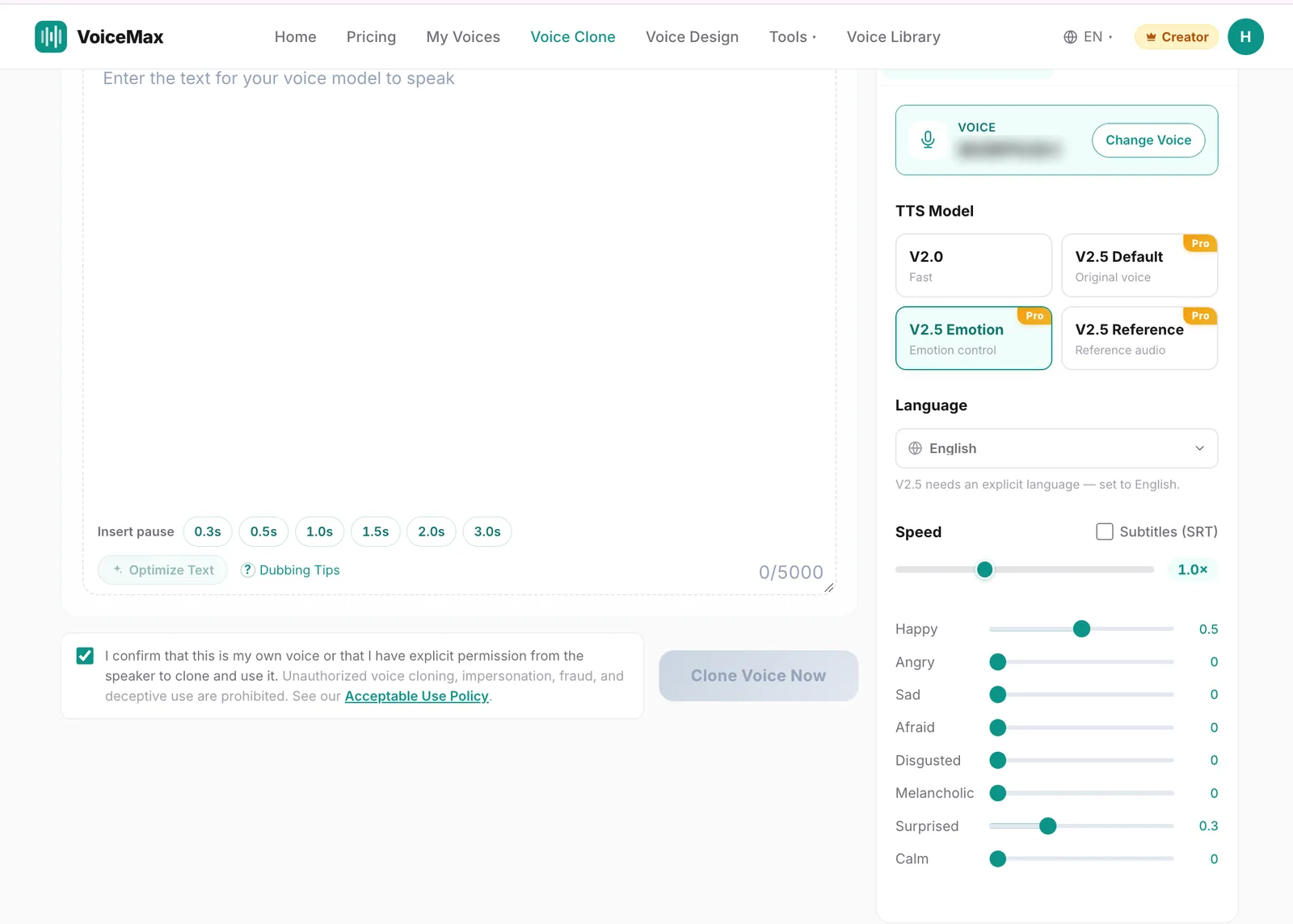
A few combinations that work well for horror:
- Afraid + Calm: a narrator trying to stay composed while something is wrong.
- Calm only, set high: detached, emotionless delivery for official warnings.
- Sad + Afraid: a ghost or victim recounting what happened.
- Angry, set low: quiet menace rather than shouting.
Keep emotion settings moderate — around 0.3 to 0.6 is a good starting range. Values near 1 can make a voice sound theatrical, which usually reduces the scare.
Making a custom scary voice with Voice Design
If none of the presets fits your character, describe the voice you want in Voice Design. Include gender, approximate age, timbre, pitch, pace, emotion, and the type of scene. For example:
- "Female voice, about 60, thin and raspy, speaking slowly in a calm, almost kind tone, like an old caretaker who knows something terrible."
- "Male voice, about 30, soft and flat, whispering every line with long pauses, emotionless and close to the microphone."
For long stories, save the designed voice with Add to Models, then generate the full script from the saved voice so it stays consistent.
Common problems and how to fix them
It sounds funny instead of scary. The voice is probably too exaggerated. Lower the drama: shorter lines, slower speed, calmer delivery. Horror usually gets scarier as it gets quieter.
The whisper is hard to understand. Keep whispered lines short and avoid complex words. Put essential story information in narration and use whispers for atmosphere.
Every line sounds the same. Vary sentence length and alternate between two voices, for example a calm narrator and a whispering presence.
There's background noise in my own recording. If you're mixing your own narration with AI voices, clean the recording first with AI noise removal, which is free on every plan.
For a full guide to the retro broadcast style, read Analog Horror Voice: How to Make VHS-Style AI Narration.
Frequently asked questions
How do I make text to speech sound scary?
Write short sentences, add pauses with ellipses and line breaks, and slow the delivery to around 0.8–0.9×. Choose a low, breathy, or whispering voice for atmosphere, or a calm and cheerful voice for unsettling contrast. Repetition and unanswered questions add tension without changing the voice.
What is the best voice for scary text to speech?
It depends on the scene. A slow, ominous narrator works for storytelling, a whisper works for close-up scares, a deep guttural voice works for villains, and a childlike or cheerful voice works for twists. Pick one voice per character and keep it consistent throughout the story.
Can I make a demon voice with text to speech?
Yes. Use a deep, guttural voice such as the Deep Demon preset, slow it down slightly, and write short, commanding lines. Pauses between commands make the voice feel heavier. For extra distortion, you can add effects such as pitch shifting or reverb in an audio editor after export.
Is the scary voice generator free?
Yes. You can generate scary voices on the Free plan with up to 10,000 characters per month, about 12 minutes of audio, for personal use. Choose a horror preset, type your line, and download the result as MP3 or WAV.
Can I use scary AI voices in YouTube videos?
Yes, on a paid plan. Commercial rights start on the Starter plan and cover monetized YouTube videos, games, podcasts, and client work. Audio generated on the Free plan is for personal use only.
How do I keep a scary voice consistent across a long story?
Use the same preset for every segment, or save a custom voice with Add to Models and generate from that saved voice. Generate the story in short blocks so you can re-generate a single line without changing the rest.
Can I make a voice that sounds like a specific horror movie villain?
No. Presets and Voice Design are meant for original synthetic voices, and imitating a specific real person or copyrighted character is not allowed. Describe the qualities you want — pitch, pace, texture, mood — and create your own original villain voice.