Analog Horror Voice: How to Make VHS-Style AI Narration

Quick answer
An analog horror voice sounds calm, official, and slightly wrong — like a narrator from an old VHS tape or an emergency broadcast that keeps talking after something terrible happens. To make one with AI, generate a flat, measured voice from a detailed description, write short procedural lines, then add tape hiss and a low-pass filter.
Key takeaways
- Analog horror rarely uses screaming voices. The fear comes from calm delivery of disturbing information.
- Four voice archetypes cover most projects: the educational narrator, the emergency announcer, the kids-show host, and the late-night storyteller.
- A good voice prompt names 6–8 traits: gender, age, timbre, pitch, pace, emotion, accent, and use case.
- Write in short, procedural sentences. Ellipses and line breaks create the unnatural pauses the genre depends on.
- The "found footage" texture comes from post-processing: a low-pass filter around 3–5 kHz, light tape hiss, and occasional dropouts.
What makes a voice sound like analog horror?
An analog horror voice is defined by restraint, not volume. The genre imitates real broadcast and instructional media from the 1960s to the 1990s, so the voice has to sound like it belongs to an institution: a public service announcement, a training film, a children's program, or a weather alert.
The horror comes from the gap between tone and content. A narrator who calmly explains what to do "if your neighbor's face looks unfamiliar" is far more unsettling than a monster growling the same line. Your goal is a voice that sounds trustworthy, then lets the script do the damage.
Three qualities matter most:
- Flat or rehearsed emotion. The speaker either sounds detached or sounds cheerful in a way that does not match the words.
- Formal pacing. Even rhythm, careful articulation, and pauses in places a real person would not pause.
- Degraded audio. Narrow frequency range, hiss, warble, and occasional signal loss. This is added afterward, not baked into the voice.
The four analog horror voice archetypes
Most analog horror audio fits one of four voice types. Pick one per character so your audience learns to recognize who is speaking.
| Archetype | Pace | Pitch & timbre | Emotion | Typical line |
|---|---|---|---|---|
| Educational narrator | Slow, even | Mid-low male, warm but stiff | Polite, instructive | "Let's review what we have learned today." |
| Emergency announcer | Measured, steady | Mid female, clear and clipped | Completely flat | "Remain indoors until further notice." |
| Kids-show host | Bouncy, then stalls | Bright, high, exaggerated | Cheerful, then wrong | "Can you say 'goodbye'? Say it to your family." |
| Late-night storyteller | Slow, with long gaps | Deep, breathy | Quiet dread | "Nobody checked the tape before it aired." |
Use the educational narrator and emergency announcer for the "official" layer of your story. Save the kids-show host for moments of tonal whiplash. The storyteller works best for framing narration at the start or end of a video.
How to make an analog horror voice with AI
You can build all four archetypes in VoiceMax without recording anything. The workflow takes about ten minutes per voice.
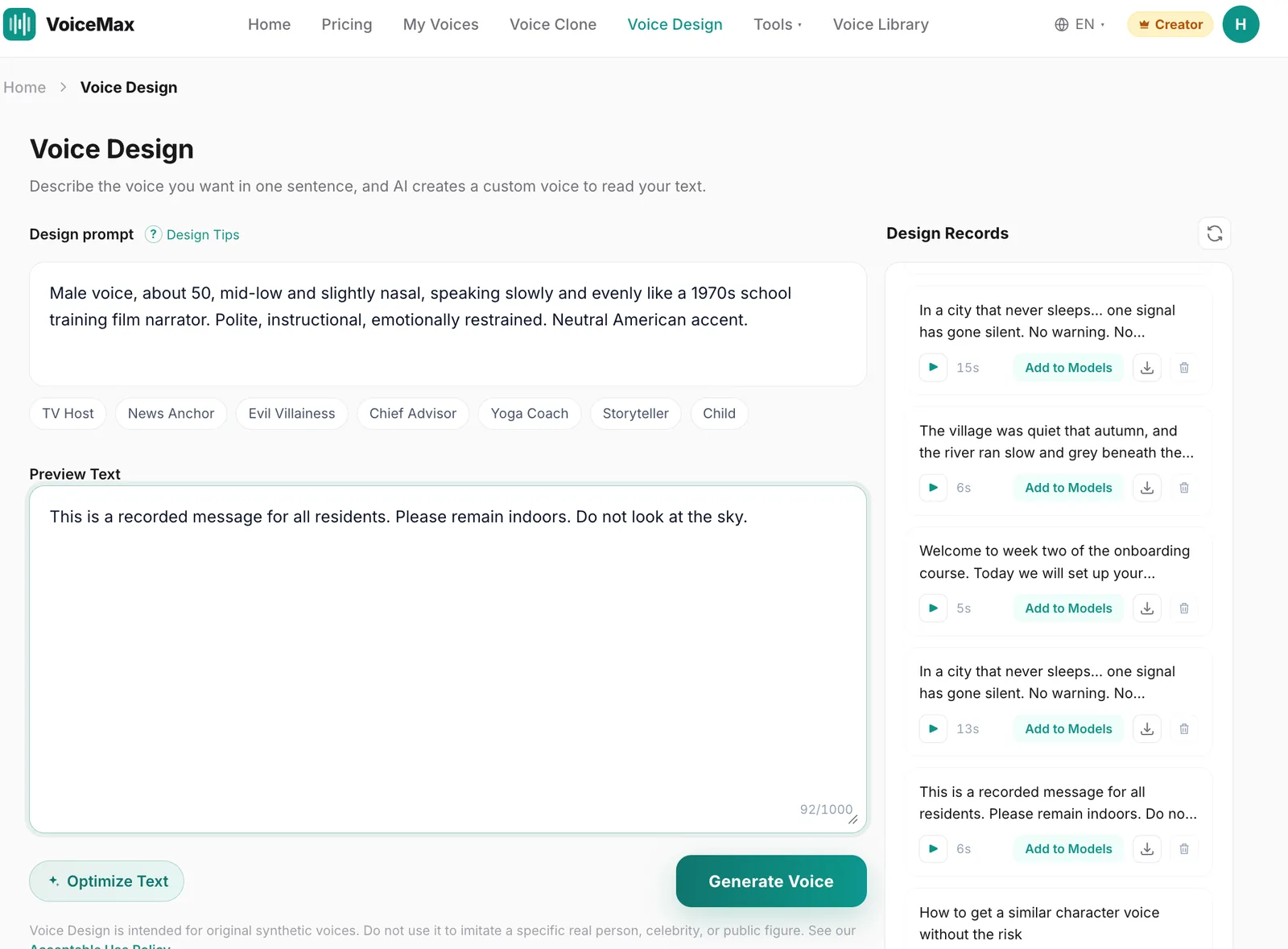
Step 1: Describe the voice in detail
Open Voice Design and describe the voice in one or two sentences. Specific traits produce more consistent results than mood words alone. You can write the description in English or Chinese.
Copy-ready examples:
- Educational narrator: "Male voice, about 50, mid-low and slightly nasal, speaking slowly and evenly like a 1970s school training film narrator. Polite, instructional, emotionally restrained. Neutral American accent."
- Emergency announcer: "Female voice, about 40, clear and clipped, steady medium pace, completely emotionless, like an automated public emergency broadcast. Neutral American accent."
- Kids-show host: "Male voice, about 30, bright and high-pitched, exaggerated cheerful energy like a children's TV host, with sudden slow-downs and flat pauses that feel unsettling."
- Late-night storyteller: "Male voice, about 55, deep and breathy, speaking very slowly with long pauses, quiet and ominous, like a late-night radio storyteller."
Avoid naming any real person, show, or channel in the description. Describe the qualities instead.
Step 2: Preview with a short line
Enter a one-sentence test script and generate a preview. Listen for two things: is the emotion flat enough, and does the pacing feel formal? If the voice sounds too dramatic, add "restrained" or "emotionless" to the description. If it sounds too modern, add "old broadcast style" or "1980s training video."
Step 3: Save the voice for longer scripts
Voice Design is best for creating the voice itself. For anything longer than a few lines, click Add to Models on your favorite result, then use that saved voice in voice cloning to generate the full script. This keeps the delivery stable across long narration.
Step 4: Generate the script in short blocks
Generate one paragraph or one "segment" at a time. Short blocks are easier to re-generate if a single line comes out wrong, and they match the chopped, archival feel of the genre. Download each block as WAV if you plan to edit heavily, or MP3 for quick drafts.
If you want ready-made horror voices instead of designing your own, the Dark Narrator and Static Phantom presets are good starting points.
Try the Scary Voice Generator →
Listen: analog horror voice samples
All samples below are AI-generated and do not represent any real person.
Compare the last sample with the first three. The processed version shows how much of the "found footage" feel comes from editing rather than the voice.
How to write an analog horror script for AI narration
The script matters as much as the voice. AI narration responds strongly to punctuation, so you can control pacing directly in the text.
Writing rules that work:
- Use procedural language. Instructions, warnings, and checklists sound official. "Step one. Close all curtains." beats "You should probably close the curtains."
- Keep sentences under 12 words. Short lines force even, deliberate delivery.
- Use ellipses for hesitation. "Your family is... safe." The pause lands exactly where you place it.
- Use line breaks for dead air. A new line often adds a slightly longer gap than a period.
- Repeat key phrases. Repetition is a core analog horror device. "Do not open the door. Do not open the door."
- Let numbers and times do the work. "At 3:12 a.m., the broadcast resumed." Specific details feel archival.
Script template 1: Emergency alert
This is an emergency broadcast. This is not a test. Residents of the eastern district should remain indoors. Do not approach windows. If you see a figure standing still in the street... do not wave. Further instructions will follow. Further instructions will follow.
Script template 2: Educational film
Good morning, students. Today we will learn about the Visitor. The Visitor is a friend to every household. When the Visitor knocks, we open the door. When the Visitor smiles, we smile back. Remember, children. Everyone smiles back.
Script template 3: Public access TV
You're watching Channel Six community programming. Our next segment has been... removed. Please enjoy this music while we resolve the situation. Do not adjust your set. We can see you adjusting your set.
All three templates are original and free to adapt for your own projects.
Post-processing: make it sound like old tape
Clean AI audio sounds too modern for analog horror. The archival texture comes from a few simple effects you can apply in any audio or video editor. VoiceMax generates the voice; these effects are applied afterward in your editing software.
| Effect | Typical setting | What it does |
|---|---|---|
| Low-pass filter | Cut above 3–5 kHz | Removes modern clarity; mimics VHS and broadcast bandwidth |
| High-pass filter | Cut below 150–250 Hz | Thins the voice like a small TV speaker |
| Tape hiss / noise | Very low, just audible | Adds constant background texture |
| Wow and flutter | Slight pitch wobble | Simulates a worn tape |
| Saturation / mild distortion | Low drive | Warmth and grit from old electronics |
| Dropouts | 0.1–0.3 s volume cuts | Signal loss at key moments |
Apply effects in this order: high-pass, low-pass, saturation, wow and flutter, then hiss. Add dropouts last and use them sparingly, ideally right before a reveal.
If your source recording or generated audio picks up unwanted noise before you add deliberate texture, clean it first with AI noise removal, which is free on every plan. Clean audio gives you full control over the "bad" sound you add later.
Common problems and how to fix them
The voice sounds too dramatic. Analog horror narrators rarely act scared. Remove words like "terrified" or "intense" from your description and add "restrained," "matter-of-fact," or "emotionless."
The voice sounds too clean and modern. This is usually a processing issue, not a voice issue. Apply the low-pass filter first; it makes the biggest difference.
Pauses feel random. Rewrite long sentences into short ones and place ellipses deliberately. One deliberate pause per line is enough.
Different segments sound like different people. Save the voice with Add to Models and generate every segment from the saved voice instead of re-designing it each time.
The cheerful host is not creepy. Contrast needs a turn. Start fully cheerful for two or three lines, then slow down or repeat a word. The shift is what unsettles listeners.
For deeper narration voices, browse the deep AI voices collection. For a full set of horror presets, see the scary voice generator. For more ways to make TTS sound frightening, read Scary Text to Speech: How to Make AI Voices Creepy.
Frequently asked questions
What is an analog horror voice?
An analog horror voice is a calm, official-sounding narration style that imitates old broadcasts, training films, and children's TV from the 1960s to 1990s. The fear comes from the contrast between a steady, trustworthy delivery and disturbing content, combined with degraded, tape-like audio quality added in post-production.
Can AI generate analog horror voices?
Yes. You can describe the voice you want in Voice Design — for example, a flat emergency announcer or a stiff educational narrator — and generate it in seconds. The voice provides the delivery; the old-tape texture comes from filters, hiss, and dropouts you add in an audio or video editor.
Which voice works best for analog horror narration?
A mid-low, emotionally restrained voice with even pacing works for most projects. Use a flat female announcer for emergency alerts, a polite male narrator for educational segments, and an overly cheerful host for tonal contrast. Pick one voice per character so listeners can follow who is speaking.
How do I make AI narration sound like an old VHS tape?
Apply a high-pass filter around 150–250 Hz and a low-pass filter around 3–5 kHz, add light saturation, a slight pitch wobble, and very quiet tape hiss. Add short volume dropouts sparingly before key moments. Generate clean audio first, then add the degradation in your editor.
Do I need a paid plan to use Voice Design?
Voice Design is included from the Starter plan. On the Free plan you can still generate horror narration with ready-made voices, such as the presets on the scary voice generator page, for personal use.
Can I use AI analog horror voices in monetized videos?
Yes, on a paid plan. Commercial rights are included from the Starter plan and cover monetized YouTube videos, games, and client work. The Free plan is for personal use only. Do not design voices that imitate a specific real person.
Can I make my voice sound like a character from an existing analog horror series?
No. Voice Design is intended for original synthetic voices, and imitating a specific real person or an existing copyrighted character is not allowed. Describe the qualities you want instead — age, pace, tone, era — and build an original voice for your own story.