AI Accent Generator: Indian and British English Voices

Quick answer
An AI accent generator turns your script into speech with a specific accent, such as Indian English or British English. With VoiceMax, you describe the accent, age, tone, and pace in one sentence in Voice Design, generate a preview, and then save the voice to reuse it on longer scripts.
Key takeaways
- Accent comes from a few audible features: rhythm, vowel quality, how "r" is pronounced, and intonation.
- A good accent prompt names the accent plus 4–5 other traits: gender, age, timbre, pace, and use case.
- Write scripts in the spelling and vocabulary of the variety you want, for example "colour" and "holiday" for British English.
- For long narration, design the voice first, add it to your models, then clone it for stable output.
- Use accents for localization, training, and original characters, never to mock a group or imitate a real person.
What an AI accent generator does
An AI accent generator produces speech in a chosen variety of a language, so the same English sentence can sound like it was spoken by someone from Bengaluru, Delhi, London, or Manchester. The goal is not to change what is said but how it sounds: rhythm, vowels, consonants, and melody.
Teams use accent voices for a few practical reasons:
- Localization. A training video for staff in India often lands better with an Indian English narrator. A product explainer for a UK audience feels more local with British English.
- Realistic dialogue. Games, audio dramas, and animated explainers need casts that sound like real, varied people.
- Customer service examples. Role-play recordings for support training are more useful when they match the callers your team actually hears.
- Language learning. Learners benefit from hearing the same vocabulary in more than one accent.
VoiceMax supports 600+ languages and accents. This guide focuses on the two English accents people ask for most often in text to speech: Indian English and British English.
Indian English vs. British English: the features that matter
The fastest way to get a convincing accent is to know which features listeners actually notice. The table below describes common tendencies in neutral, phonetic terms. Both are broad labels: India has many regional varieties of English, and Britain has dozens of distinct regional accents.
| Feature | Indian English (general tendencies) | British English, RP-style (general tendencies) |
|---|---|---|
| Rhythm | Syllables often receive more even weight, giving a steady, measured pulse | Stress-timed: stressed syllables stand out, unstressed ones shorten |
| "r" after vowels | Usually pronounced ("car", "water" keep the r) | Usually not pronounced ("car" sounds like "cah") |
| t and d | Often made with the tongue further back, giving a slightly firmer sound | Clearly released "t" in careful speech ("better") |
| Vowels | Vowels tend to be full and clear, with fewer reduced "uh" sounds | Long "ah" in words like "bath" and "path"; many reduced vowels in unstressed syllables |
| Intonation | Pitch often moves within a phrase; emphasis can fall on different words than in US English | Generally falling at the end of statements; rises signal questions or continuation |
| Typical use in content | Training, tech explainers, customer support role-play, local ads | Audiobooks, documentaries, brand narration, period characters |
What this means for prompts: you do not need to spell out every feature. Naming the accent clearly and adding the right delivery traits (pace, warmth, formality) gets you most of the way. The table is most useful when a preview sounds "almost right" and you need words to describe what to change.
How to make an accent voice in VoiceMax
The reliable workflow is: describe, preview, refine, save, then clone for long scripts. Voice Design creates a brand-new synthetic voice from your description, so there is no need to upload anyone's recording.
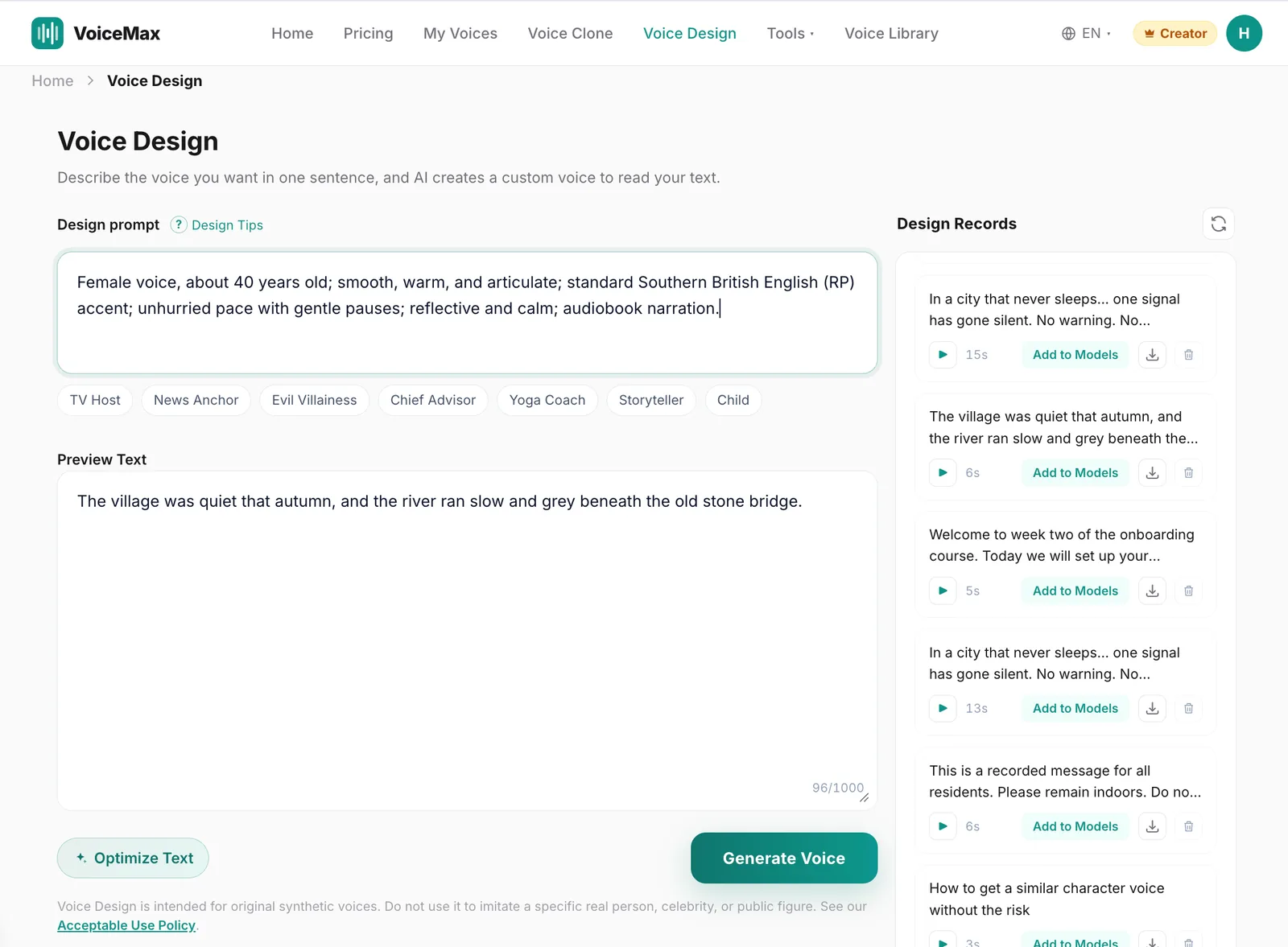
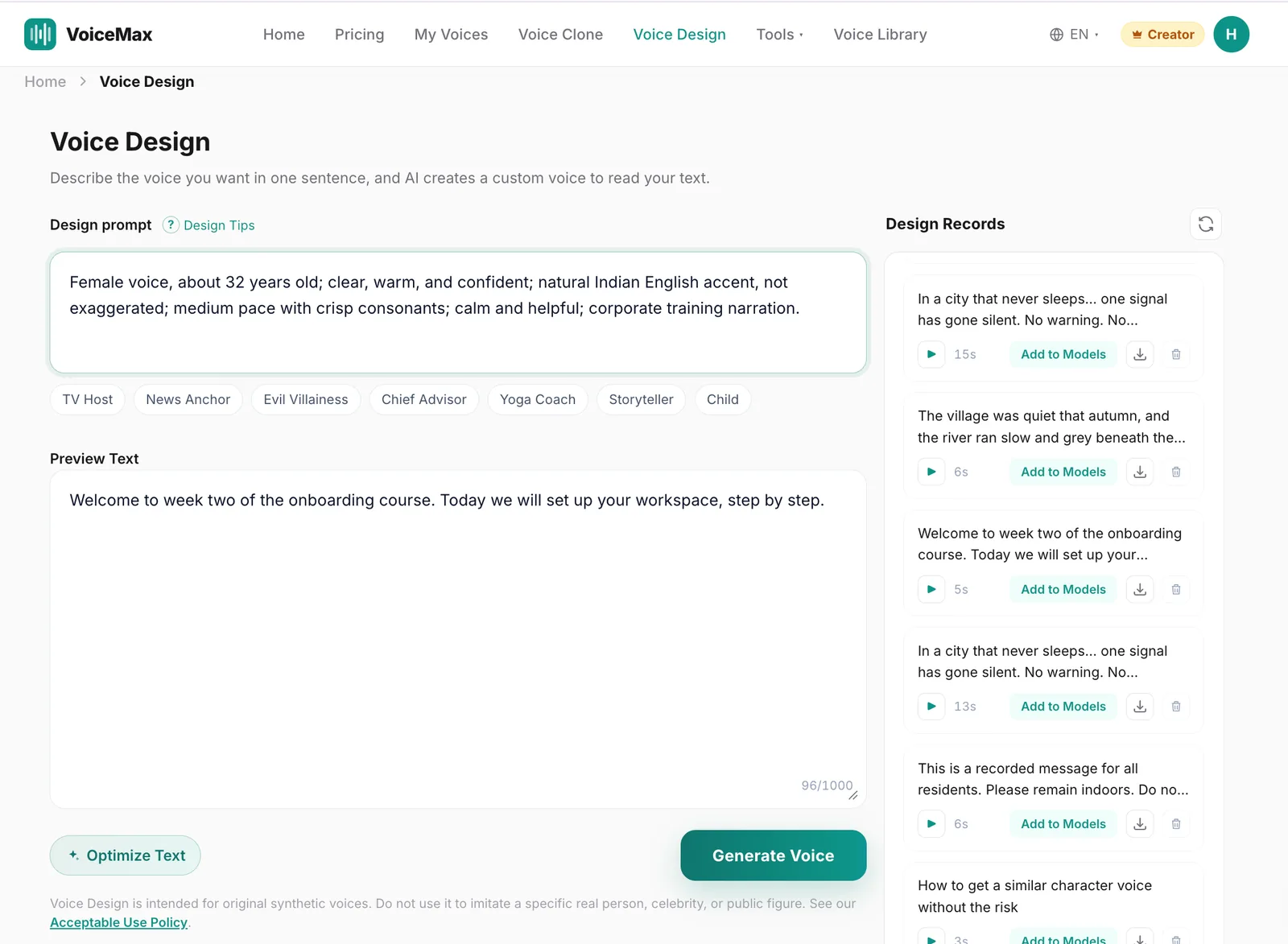
- Open Voice Design and write a one-sentence description (see the prompt examples below).
- Enter a short preview line of 1–2 sentences written in the target variety of English.
- Generate and listen. Check the accent first, then pace, then tone.
- Refine one trait at a time. If the accent is too light, say "clear, noticeable Indian English accent". If it sounds exaggerated, say "natural, everyday Indian English accent, not exaggerated".
- Add to Models. Design records are kept for 3 days, so save the voice you like. Clips between 5 and 30 seconds can be added to your models.
- Clone and generate long scripts. Designed voices are best for creating the voice; for full narration, use the saved, cloned version for more stable output.
Design your own accent voice →
Prompt examples you can copy
You can write Voice Design prompts in English or Chinese. Each example below names the accent, then adds gender, age, timbre, pace, emotion, and use case.
| Voice | Prompt (paste into Voice Design) |
|---|---|
| Indian English, female, professional | Female voice, about 32 years old; clear, warm, and confident; natural Indian English accent, not exaggerated; medium pace with crisp consonants; calm and helpful; corporate training narration. |
| Indian English, male, friendly explainer | Male voice, about 28 years old; bright and friendly; everyday Indian English accent; slightly quick, conversational pace; upbeat and encouraging; tech tutorial and app walkthrough style. |
| British English (RP), female narrator | Female voice, about 40 years old; smooth, warm, and articulate; standard Southern British English (RP) accent; unhurried pace with gentle pauses; reflective and calm; audiobook narration. |
| British English (RP), male, documentary | Male voice, about 50 years old; rich, measured, and authoritative; standard British English (RP) accent; slow, even pace; composed and curious; nature documentary narration. |
Tips for better accent prompts
- Put the accent early in the sentence so it is not lost among other traits.
- Add "natural" or "everyday" to avoid a caricatured result.
- Match age and use case to the accent's job: a 50-year-old documentary narrator and a 28-year-old app explainer sound very different, even with the same accent.
- If you need a regional British accent rather than RP, name it plainly, for example "Northern English accent" or "Scottish English accent", and preview carefully.
Listen: four accent samples
Each sample below was generated from the prompts in the table above, using the preview line shown. No editing or effects were applied.
Notice how the British samples use "autumn" and "grey". Small spelling and vocabulary choices in the script support the accent, which brings us to scripts.
Writing scripts that support the accent
The script matters almost as much as the voice. A British voice reading American idioms sounds slightly off, and an Indian English voice reading stiff, overly formal text can sound robotic.
For British English:
- Use British spelling: colour, organise, centre, programme.
- Use British vocabulary where it fits: holiday (not vacation), flat (not apartment), queue (not line), mobile (not cell phone).
- Write dates and numbers the British way: "5 November", "half past three".
For Indian English:
- Use the vocabulary and examples your audience already uses at work or in daily life, such as local place names, currencies, and product names.
- Keep sentences short and direct for training content. Clear structure helps any voice sound natural.
- Write numbers the way your audience reads them. If your audience uses lakh and crore, spell them out in the script so the voice reads them correctly.
For both:
- Use punctuation to control rhythm. Commas create short pauses; full stops create longer ones.
- Read the script aloud once yourself. If you stumble, the AI voice probably will too.
- Spell out abbreviations the way they should be spoken ("A I" vs. "AI", "Sept" vs. "September").
Where accent voices work best
| Use case | Recommended voice | Why it works |
|---|---|---|
| Employee onboarding for teams in India | Indian English, professional (AC-1 style) | Familiar accent improves comprehension and trust |
| App tutorials for South Asian markets | Indian English, friendly explainer (AC-2 style) | Conversational pace suits short how-to clips |
| UK-focused brand videos | British English, warm narrator (AC-3 style) | Signals a local, considered brand voice |
| Documentaries and audiobooks | British English, documentary (AC-4 style) | Measured pace and clear articulation suit long listening |
| Language-learning materials | Both, reading the same text | Learners hear one sentence in two accents |
| Games and audio drama casts | Mix of accents, ages, and timbres | Varied casts feel more real |
If your project needs a narrator but not a specific accent, the narrator voices in the voice library are ready to use without designing anything. For broadcast-style delivery, see our guide to AI announcer voices.
Using accents responsibly
Accent voices are a tool for representation and localization. A few rules keep them that way:
- Do not mock. Exaggerated accents used for jokes at a group's expense damage trust and can violate platform rules. Prompt for "natural" and "everyday" delivery.
- Do not imitate real people. Voice Design is for original synthetic voices. Do not describe a specific celebrity, public figure, or private person.
- Cast thoughtfully. If a character is from a specific region, research how people there actually speak, or ask someone from that region to listen to your preview.
- Disclose when it matters. If listeners might assume a real person recorded the audio, a short note that the voice is AI-generated keeps things honest.
Troubleshooting common accent problems
| Problem | Likely cause | Fix |
|---|---|---|
| Accent is too faint | Accent buried at the end of the prompt, or described vaguely | Move the accent to the start; say "clear, noticeable … accent" |
| Accent sounds exaggerated | Prompt words like "strong" or "heavy" | Use "natural, everyday … accent, not exaggerated" |
| Voice sounds flat on long scripts | Using the designed voice directly for long text | Add the voice to your models and use the cloned version |
| Words mispronounced | Abbreviations, numbers, or brand names | Spell them out phonetically in the script |
| British voice sounds American in places | American spellings and vocabulary in the script | Switch to British spelling and vocabulary |
Frequently asked questions
What is an AI accent generator?
An AI accent generator is a text-to-speech tool that speaks your script in a chosen accent, such as Indian English or British English. In VoiceMax, you create the accent voice with Voice Design by describing it in one sentence, then use it for previews or save it to generate longer audio.
Can I generate an Indian English accent with VoiceMax?
Yes. Describe the voice in Voice Design, for example "female voice, about 32, natural Indian English accent, clear and warm, medium pace, corporate training narration". Preview it, adjust one trait at a time, and save the version you like to your models.
How do I make a British accent text to speech voice?
Name the accent early in your Voice Design prompt, such as "standard British English (RP) accent", then add gender, age, timbre, pace, and use case. Write your script with British spelling and vocabulary, like "colour" and "holiday", so the words support the accent.
Can I choose a regional accent instead of a general one?
You can describe regional accents, for example a Northern English or Scottish English accent, in your prompt. Results vary by accent, so preview a few short lines first and refine the description before generating a long script.
Why does my accent voice sound exaggerated?
Words like "strong" or "heavy" in the prompt push the voice toward a caricature. Replace them with "natural, everyday accent, not exaggerated", keep the tone calm or friendly, and check that the script itself does not use stereotyped phrasing.
Can I use accent voices commercially?
Yes, on a paid plan. Commercial rights start with the Starter plan, which also includes Voice Design, so you can publish accent voices in videos, courses, ads, and client work. The Free plan is for personal use only.
Can I make a voice that sounds like a specific person with that accent?
No. Voice Design is for original synthetic voices, and imitating a specific real person, celebrity, or public figure is not allowed. If you need a particular person's voice, clone it only from a recording you own or have explicit permission to use.