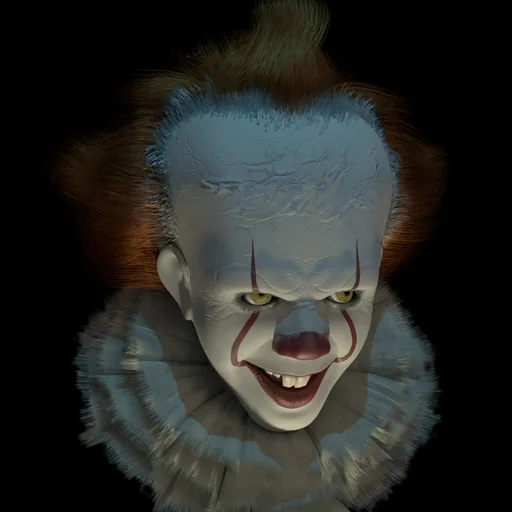
Pennywise Voice Generator
This Pennywise voice tool turns your text into a giggling, sing-song clown that can switch to a menacing growl mid-sentence. The delivery takes its cue from the dancing clown of It, and VoiceMax renders each line in a few seconds as a downloadable MP3. Try it free for Halloween setups, horror edits, pranks and soundboard clips.
Pennywise AI voice on VoiceMax is an AI recreation for parody, commentary and fan content. VoiceMax is not affiliated with or endorsed by Warner Bros. or Stephen King.
Listen to samples
Pennywise AI Voice: Key Facts
| Voice style | Sweet, teasing clown cadence that drops into a low, gravelly snarl |
|---|---|
| Best for | Halloween props, horror edits, pranks, soundboards |
| Languages | Character voice: 10 languages (English, Spanish, Japanese +7). Voice cloning: 600+ languages. |
| Output | MP3 download |
| Free to try | 10,000 characters per month |
| Generation time | 10 seconds for a 200-character line |
| Not for | Impersonation, scams, ads or anything presented as a real statement |
What Does Pennywise Sound Like?
Expect two voices in one. The opening is light and teasing, like a party clown waving you over, with long stretched vowels and little giggles tucked between words. Then the pitch falls away into a rough, low snarl that arrives without warning. Scripts that bait first and threaten second get the most out of it, because the shift itself is what lands the scare.
Who Is Pennywise?
Pennywise the Dancing Clown is the shape-shifting creature at the center of Stephen King's 1986 novel It, a monster that wakes every 27 years to feed on the children of Derry, Maine. Tim Curry first brought the clown to the screen in the 1990 TV miniseries, and Bill Skarsgård took over for the 2017 film and its 2019 follow-up, cementing Pennywise as a fixture of modern horror.
It 2017 Pennywise Voice Style
The 2017 film version leans childlike and almost shy before it turns. To get closer to that feel, open with a gentle, friendly sentence and keep the threat to a few blunt words at the end; the AI voice carries the change in tone on its own.
Pennywise Soundboard
Building a Pennywise soundboard takes a few minutes: generate a handful of short clips such as a giggle, an invitation and a warning, save each MP3, then import them into a soundboard app, a Discord bot or a Bluetooth Halloween speaker.
Pennywise Voice Changer for Pranks and Halloween
Instead of a live voice changer, type the line you want and let VoiceMax render it. Hidden speakers make the effect work best: tuck one behind a doorbell, inside a haunted-house prop or under a pile of balloons and trigger the clip when guests walk by.
Pennywise Voice Lines & Script Ideas
Halloween
- “Hiya, trick-or-treater! Want a balloon? Come a little closer...”
- “Come closer... I have candy. Lots and lots of candy.”
Horror edits
- “Nobody leaves the circus early.”
- “Don't you want to play? Everyone plays.”
Pranks
- “I can see you through the window. Nice pajamas.”
How to Make a Pennywise AI Voice
- Add your script — Type or paste up to 5,000 characters per generation (500 on the Free plan), or start from a script idea above.
- Click Generate — In about 10 seconds the Pennywise AI voice reads it back.
- Export — Preview the take and save the MP3 for your edit, stream or soundboard.
Best Ways to Use the Pennywise AI Voice
- Halloween doorbell and haunted-house audio
- Horror shorts and fan edits
- Soundboards and harmless pranks
- Intros for a horror movie night
Related Voices
Freddy Fazbear AI Voice
Low, glitchy animatronic voice for horror

Trollge AI Voice
Cavernous, distorted, demonic voice for meme horror
Baldi AI Voice
A 90s edutainment teacher who goes from chipper to chilling

The Grinch AI Voice
Sneering, grumpy Christmas grouch voice
Darth Vader AI Voice
A slow, booming Sith-lord delivery with a hint of helmet hiss

Jinx AI Voice
Gleeful, chaotic voice with a dangerous giggle
Pennywise AI Voice FAQ
How do I make a Pennywise voice?
Is this the 2017 or the 1990 Pennywise voice?
Can I use the Pennywise voice as a Halloween sound effect?
Is the Pennywise AI voice generator free?
Can I use the Pennywise AI voice commercially?
Is this the official Pennywise voice?
What kind of script makes the Pennywise AI voice scariest?
How long can a Pennywise voice clip be?
Can I put the Pennywise voice in TikTok or YouTube horror edits?
Is this Bill Skarsgård's or Tim Curry's real voice?
Does the Pennywise voice work on a phone?
Can I make the Pennywise voice speak languages other than English?
Try More AI Voices
Browse every celebrity and character voice and find the right one for your next clip.