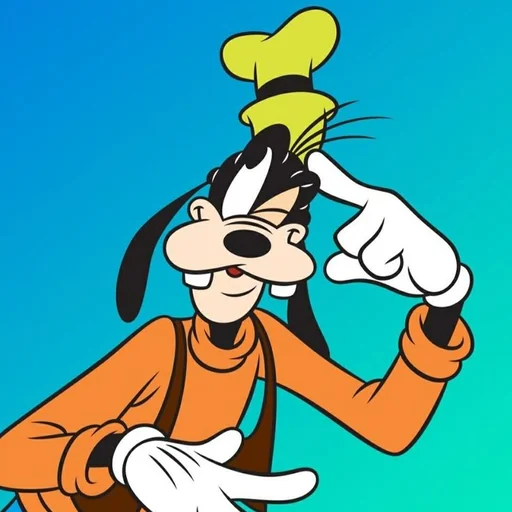
Goofy AI Voice Generator
With this Goofy AI voice, VoiceMax speaks your text in a warm, bumbling cartoon drawl inspired by Disney's Goofy. Write a line, tap Generate and grab the MP3 seconds later, free to try. It fits children's videos, family greetings and goofy-ahh memes equally well.
Goofy AI voice on VoiceMax is an AI recreation for parody, commentary and fan content. VoiceMax is not affiliated with or endorsed by Disney.
Listen to samples
Goofy AI Voice: Key Facts
| Voice style | Slow, warm drawl that's a little dopey, finished with an "ah-hyuck" chuckle |
|---|---|
| Best for | Children's videos, family greetings, goofy-ahh memes |
| Languages | Character voice: 10 languages (English, Spanish, Japanese +7). Voice cloning: 600+ languages. |
| Output | MP3 download |
| Free to try | 10,000 characters per month |
| Generation time | 10 seconds for a 200-character line |
| Not for | Impersonation, scams, ads or anything presented as a real statement |
What Does Goofy Sound Like?
Think warm, a bit hoarse and endlessly easygoing: the Goofy AI voice drags its vowels in a lazy, Southern-flavored drawl. It stumbles through sentences as if on purpose and sprinkles in a happy "gawrsh" or "ah-hyuck!" whenever it can. The result is silly without ever being mean, which is why it works for family videos and harmless jokes alike.
Who Is Goofy?
Goofy first appeared in Disney cartoons in 1932 as one of Mickey Mouse's pals. Pinto Colvig gave him his original voice, and Bill Farmer has voiced him since 1987. He is loved for his clumsy good nature, his trademark laugh and his lead role in A Goofy Movie.
AI Goofy Voice Generator
Feed any line to the AI Goofy voice generator and it comes back with his drawl and chuckle built in. Writing "ah-hyuck" or "gawrsh" into the text is the easiest way to cue his trademark sounds.
Goofy Text to Speech & Voice Changer
Goofy text to speech is handy for party invitations, family vacation videos and cartoon spoofs. Planning a Mickey and Goofy scene? Create Mickey's dialogue on the Mickey Mouse page, then cut the two sets of clips together.
AI Goofy Ahh Memes
A "goofy ahh" meme pairs something serious with the silliest voice imaginable. Write a dramatic announcement, render it in Goofy's voice and the mismatch does the comedy for you.
Goofy Voice Lines & Script Ideas
Family & kids
- “Gawrsh, happy birthday, pal! Ah-hyuck!”
- “Time for bed, little buddy. Even Goofy needs his sleep.”
Memes
- “Ah-hyuck! I meant to do that.”
- “Gawrsh, I think I locked my keys in the car. Again.”
Fan scenes
- “Hey, Mickey! Wait up! Whoa-oa-oa-hoo-hoo-hoo!”
How to Make a Goofy AI Voice
- Choose your words — Use one of the ready-made Goofy lines or write your own (5,000 characters max; 500 on Free).
- Render the clip — Press Generate and wait roughly 10 seconds.
- Grab the file — Play it, try another take if needed, then download the MP3.
Best Ways to Use the Goofy AI Voice
- Birthday greetings for kids
- Family trip and holiday videos
- Goofy-ahh memes
- Disney-style parody skits alongside Mickey
Related Voices
Mickey Mouse AI Voice
Sunny cartoon falsetto with that famous laugh

SpongeBob AI Voice
Squeaky, endlessly optimistic cartoon voice with a famous laugh
Elmo AI Voice
A tiny red Muppet who giggles and calls himself Elmo
The Grinch AI Voice
Sneering, grumpy Christmas grouch voice
Peter Griffin AI Voice
Booming Rhode Island dad voice with a wheezy laugh
The Loud House AI Voice
Peppy cartoon kid voice that talks straight to the camera
Goofy AI Voice FAQ
How do I make a Goofy AI voice?
How do I do a Goofy voice myself?
Can Goofy and Mickey talk together?
What kind of lines sound best in the Goofy voice?
What is a goofy ahh voice?
How long can a Goofy voice clip be?
Can I use the Goofy voice on TikTok, Reels or YouTube Shorts?
Can I generate the Goofy voice on my phone?
Can I use the Goofy voice for a business or YouTube sponsor read?
Is the Goofy AI voice generator free?
Can I use the Goofy AI voice commercially?
Is this the official Goofy voice?
Try More AI Voices
Browse every celebrity and character voice and find the right one for your next clip.